As this project gets more to class part, this blog will become education than hardware/software oriented.
There is a major trend toward MOOCs (Massive Open Online Courses). Many people from all over the world sign up for a free online course on an interesting, current topic or that uses a current tool. A certificate is usually offerred the few who complet the course. Most students will end-up auditing the class.
But like most classes, the teacher of a MOOC and how well the student know what to expect each week/unit (to plan), determines who completes the course. Easy to disappear from MOOC.
But it is a way to help Life Long Learning without going back to school. The a MOOC has unique challenges. How to grade... robot grader or peer grading using a rubric. Usual elearning challenges... engagement. Short videos help. But when the some questions and answered in a video, you feel like the prof is really there for the class.
So far Coursera is my favorite. The LMS is flexible enough to help prof respond to pattern needs. To help avoid drop-outs one class used only top x grades and other allowed a certain number late days to be used as needed. Peer grading was new and is a good as the rubric instructions.
Venturelab wanted us to work in online team - super idea, but started telling us to just get to know each other and look for a team to join. I felt dumped in. No Onboarding. The course improved as it went on.
Udacity course I am signed up for are finished, but due to robot graders are still offered for independent study. They have are sooo many small step (short video, quiz, repeat) Keeps me engaged, but also want a break too. Of course I did the 1 unit in 1-2 days. So might be different if have a week.
What I don't like is none of the LMSs used are available to "outsiders" to try.
----
Next:
Look at LMSs layouts vs Moodle default list layout
Look at / try Code Academy... another LMS or something slightly different.
----
Some related links on trends:
top-ed-tech-trends-2012-moocs
gamification in classroom
how-long-does-it-take-to-create-learning
Thursday, January 3, 2013

Wednesday, October 24, 2012
Oct.24 15+Interviews Summarized
Here is a quick summary of all 17 Interviews ( 30-40 minutes) on what is needed to teach IEC 61499 standard on distributed control and automation. Next: summarize by question/topic.
.

.
Wednesday, August 1, 2012
Aug.1 PLC Training
If PLC programmers and technicians will use the IEC 61499 tutorials to extend their applications to include distributed control, then looking at PLC programming classes might be useful. This can help to know..
These were found via ads, google, http://www.plctalk.net
- ...what they know to go from their known to their related unknown
- ... what terms do they use, what standards methods do they follow, etc
These were found via ads, google, http://www.plctalk.net
- http://www.ronbeaufort.com/main_frame_page.htm
- http://www.ehow.com/how_6824747_learn-plc-programming.html
- http://www.plctechnician.com/index.php
- http://www.thelearningpit.com/lp/doc/index.htmlhttp://www.thelearningpit.com/lp/doc/index.html
- http://www.koldwater.com
- http://www2.tesc.edu/syllabus/current/CTR-212/syllabus_CTR-212.html
- http://www.galilmc.com/learning/tutorials.php?type=plc
- alternative PAC: http://www.opto22.com/site/learn.aspx
Wednesday, July 25, 2012
July 25 LMS USB distributed too
Mainly been working on a full set of FBs for the KIPR KISS CBC v2...
So iRobotCreate FB tests are what comes next.
But now the new LMS USB communication is working and allows distributed applications.
FBDK with 2 Simulated LEDs. and checkbox.
If the Box is checked the FBDK LED, and LED 1 on 2 different LMSs turns on.
Not yet working is LMS publishing results to other devices.
Here is a first try at an LMS distributed application::
So iRobotCreate FB tests are what comes next.
But now the new LMS USB communication is working and allows distributed applications.
FBDK with 2 Simulated LEDs. and checkbox.
If the Box is checked the FBDK LED, and LED 1 on 2 different LMSs turns on.
Not yet working is LMS publishing results to other devices.
Here is a first try at an LMS distributed application::
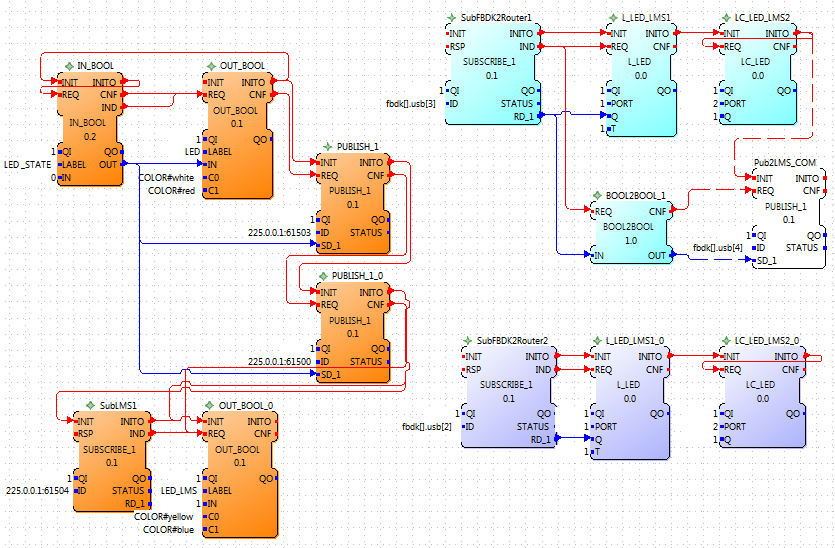 |
| Application on the resources FBDK, LMS1, LMS2 and a Routing Resouce |
 |
| Routing Resource Application |
Wednesday, June 27, 2012
July 27 CBC forte implementation
Designing the interfaces for all CBC functions except for create functions (coming) produced interfaces amazingly similar to LMS FBs for similar sensors. Motors are quite different, but not the interface. So are general FB interfaces needed, where only the insides changes or are that can be used as templates?
Forte Specific questions:
Nothing major, but need to note
Forte Specific questions:
Nothing major, but need to note
- WSTRING and STRING data inputs and String functions like strcmp. What type conversions are needed to get it to work. [ask in fordiac forums]
- RSP exported like a normal input event, but it isn't [forte issue - start outside of forums]
- CBC shut_down_in(float delay) Delay is a time, but is type float. 1499 uses "REAL" for float, (I thought), but get type problem. Plus really should use TIME for type even if have to translate it to float. [Assume seconds, but will test and work on translation]
Wednesday, May 30, 2012
May 29 4DIAC on CBC BotBall
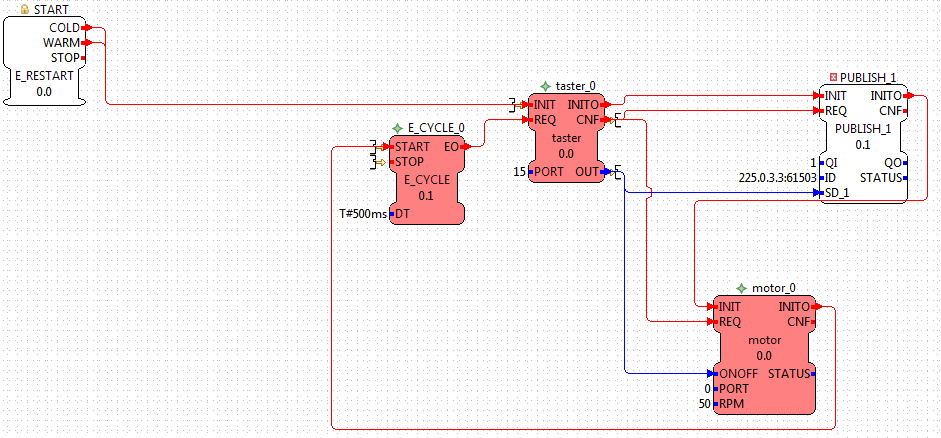
Thanks to KIPR for providing the equipment to perform the following test IEC 61499 application mapped to 3 devices over WLAN while visiting.
Finally a truly distributed application for demonstrating a distributed standard.
CBC being Linux based made this simplier.
Test Case:
PC has START/STOP push buttons via IN_EVENTs. When START is pressed, a touch sensor on CBC 1 is allowed to work. When touch sensor is pressed a motor CBC1 runs and the action is mirrored on CBC2 by a motor also running. Release and both motor on CBC1 and CBC2 stop. If STOP on the PC is pressed then the touch sensor on CBC1 has no affect. Additionally a Servo motor moved on CBC 1.
Additional test: No PC: Download application and turn off PC. Touch turns on a motor on both CBC 1 and CBC2.


Finally a truly distributed application for demonstrating a distributed standard.
CBC being Linux based made this simplier.
Test Case:
PC has START/STOP push buttons via IN_EVENTs. When START is pressed, a touch sensor on CBC 1 is allowed to work. When touch sensor is pressed a motor CBC1 runs and the action is mirrored on CBC2 by a motor also running. Release and both motor on CBC1 and CBC2 stop. If STOP on the PC is pressed then the touch sensor on CBC1 has no affect. Additionally a Servo motor moved on CBC 1.
Additional test: No PC: Download application and turn off PC. Touch turns on a motor on both CBC 1 and CBC2.



Saturday, May 5, 2012
May 5 Robotic Arm app
The real task is to:
Currently this application is divided into 3 parts corresponding the 3 motor functions:
1. UP/ DOWN robotic arm until Touch pressed :

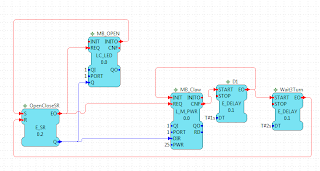
- Arm Down
- Claw Close (pick-up cup or other object)
- Arm Up
- Turn
- Claw Open (drop object)
- Turn back (reset)
Currently this application is divided into 3 parts corresponding the 3 motor functions:
- UP/ DOWN robotic arm until Touch pressed
- OPEN / CLOSE claw
- Turn RT/LT
1. UP/ DOWN robotic arm until Touch pressed :

2. OPEN / CLOSE claw = 3. Turn RT/LT except for motor and led port #s
Claw Close, Stop, wait until needed again, Open, Stop
Turn Right, Stop, wait until needed again, Left, Stop
Currently looking into if this is best as Composite FB or Sub-system.
The generalized version has the problem that both motor plus and motor minus end with motor stop, from the last event output its not clear if its from forward or backward.

Subscribe to:
Posts (Atom)