Wednesday, July 25, 2012

July 25 LMS USB distributed too

Mainly been working on a full set of FBs for the KIPR KISS CBC v2... 
So iRobotCreate FB tests are what comes next.


But now the new LMS USB communication is working and allows distributed applications.


FBDK with 2 Simulated LEDs. and checkbox. 
If the Box is checked the FBDK LED, and  LED 1 on 2 different LMSs turns on. 
Not yet working is LMS publishing results to other devices.


Here is a first try at an LMS distributed application::
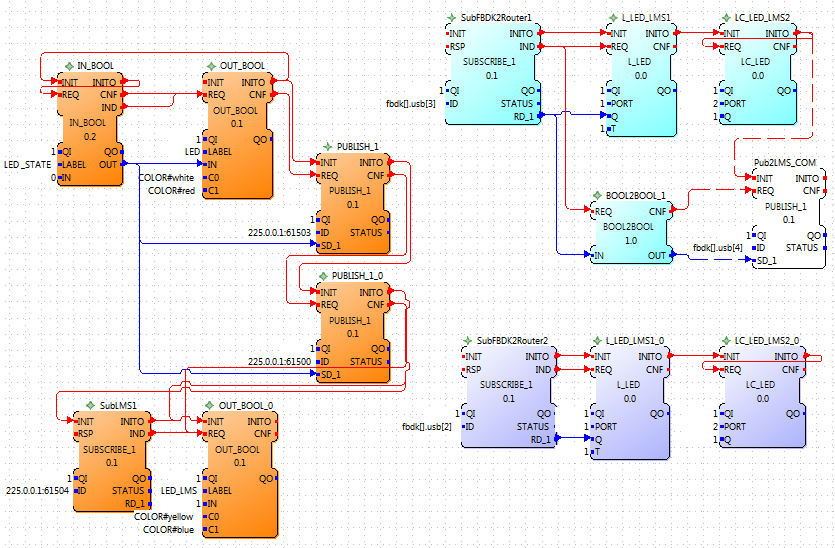
Application on the resources FBDK, LMS1, LMS2 and a Routing Resouce 


Routing Resource Application


Wednesday, June 27, 2012

July 27 CBC forte implementation

Designing the interfaces for all CBC functions except for create functions (coming) produced interfaces amazingly similar to LMS FBs for similar sensors. Motors are quite different, but not the interface. So are general FB interfaces needed, where only the insides changes or are that can be used as templates?


Forte Specific questions:
Nothing major, but need to note 

  • WSTRING and STRING data inputs and String functions like strcmp. What type conversions are needed to get it to work.  [ask in fordiac forums]
  • RSP exported like a normal input event, but it isn't [forte issue - start outside of forums]
  • CBC shut_down_in(float delay)  Delay is a time, but is type float. 1499 uses "REAL" for float, (I thought), but get type problem. Plus really should use TIME for type even if have to translate it to float. [Assume seconds, but will test and work on translation]

Wednesday, May 30, 2012

May 29 4DIAC on CBC BotBall

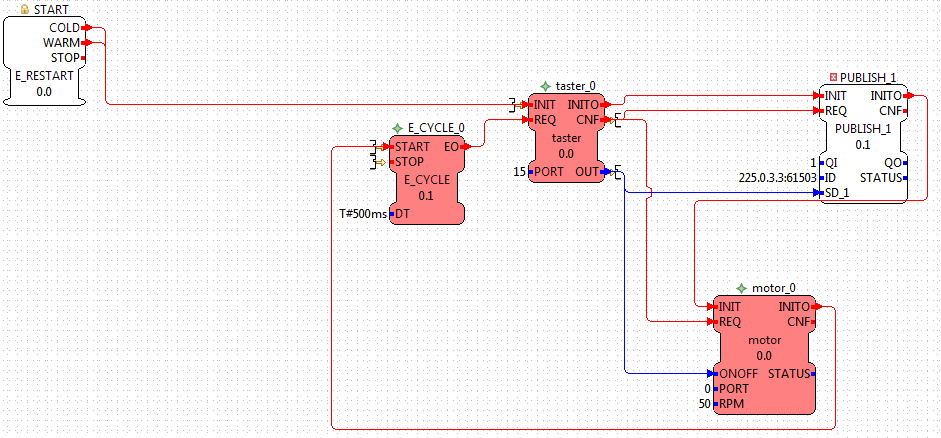
Thanks to KIPR for providing the equipment to perform the following test IEC 61499 application mapped to 3 devices over WLAN while visiting.
Finally a truly distributed application for demonstrating a distributed standard.
CBC being Linux based made this simplier.


Test Case:
PC has START/STOP push buttons via  IN_EVENTs. When START is pressed, a touch sensor on CBC 1 is allowed to work. When touch sensor is pressed a motor  CBC1 runs and the action is mirrored on CBC2 by a motor also running. Release and both motor on CBC1 and CBC2 stop. If STOP on the PC is pressed then the touch sensor on CBC1 has no affect. Additionally a Servo motor moved on CBC 1.
Additional test: No PC: Download application and turn off PC. Touch turns on a motor on both CBC 1 and CBC2.


Saturday, May 5, 2012

May 5 Robotic Arm app

The real task is to:

  • Arm Down
  • Claw Close (pick-up cup or other object)
  • Arm Up
  • Turn 
  • Claw Open (drop object)
  • Turn back (reset)

Currently this application is divided into 3 parts corresponding the 3 motor functions:

  1. UP/ DOWN robotic arm until Touch pressed 
  2. OPEN / CLOSE claw
  3. Turn RT/LT 
Extra E_DELAYs are used to simulate when another motor would be active.

1. 
UP/ DOWN robotic arm until Touch pressed :

2. OPEN / CLOSE claw = 3. Turn RT/LT   except for motor and led port #s

Claw Close, Stop, wait until needed again, Open, Stop
Turn  Right, Stop, wait until needed again,  Left,  Stop

Currently looking into if this is best as Composite FB or Sub-system.
The generalized version has the problem that both motor plus and motor minus end with motor stop, from the last event output its not clear if its from forward or backward.

May 5 64-bit= technical difficulties

May labs will be done with a press simulation. Posts about planned lab apps were to be posted  after the lab, but no reason to wait now.


Lab computers are 64-bit Win7. We have a driver that works, basically the standard usbserial driver labeled as ecos. However for the usb ethserial communication we have not found the right combination. Lots of others have had problems, but none found match ours close enough to help. Even the students labtops are now 64-bit.


If anyone reading this knows how to get the RXTX dlls and jar file working under Win7  64-bita please post a comment here or answer my StackOverflow question.  It appears to be the right combination of path and 32-bit or 64 bit driver, java, RXTX files, which we have not yet found.


Additionally a USB ethserial version of PUBLISH / SUBSCRIBE FBs has been started using the new layered communication in FORTE.

Tuesday, April 10, 2012

Apr.10 Building

The lab in May needs Lego constructions to be programmed using IEC 61499.
http://www.nxtprograms.com/ projects are a good starting place to look for models to program with IEC 61499.  A modified NXT Robot Arm will be used in the May lab. Today built, modified, and tried 2 more nxtprogram projects. The Peg Sorter will also work for a quick lab exercise.  Turning "Forklist"  needs modification and may not be ready for May lab.


NXT Forklist that turns like NXT Robot Arm
So today modified the NXT Forklist to turn in circle like the NXT Robot Arm and go up and down. Only still need to go in and out and putting on a "car" may be the easiest solution.


NXT Peg Sorter 
This construction uses a light sensor and 2 motors. 
Modified so the peg pusher can be returned to it beginning "open" position.
Possible problem, if the motor stops, so white pegs are not free to fall through.
Need to test. Possibly change construction slightly.

Monday, March 26, 2012

Mar.26 Mechanical arm and claws

Looks like the first lab exercise is changing from the line follower to a mechanical arm because another institute deals with moving robots and automation. At the moment it seems the need for  hysteresis controller is gone.


Main Task:  Using IEC61499 and the Lego robot claw arm grab an object and drop into boxes of various heights. 
Use step-wise refinement:  
1. Motor movements (up/ down; open/close; right/left)
2. Safety shut-off: Stop with touch indicates down
3. Do something: 
    3a. Grab ball
    3b. Go up with ball
    3c. Move to right or left with ball
    3d. Release ball in a box
4.  Do all steps in 3 together:
    4a. using switches
    4b. Automatically


Advanced task: (from  NXTprograms Robot Arm)  Exchange two balls.


The NXTprograms Robot Arm is used as the base design.
It used 3 motors:
  • circling (left/right)
  • up/down
  • open/close of a claw
A touch sensor is included as a switch.


Added for the lab:
  • LED for indicator  
  • Touch sensor on arm attached to the claw motor to know when the robot arm is down


claw with touch sensor for down

3 claws are being tested
  1. NXTprograms Robot Arm  4 prong claw with 2 prongs fixed
    • simple 
    • fixed in one position on one side
  2. 3 Prong Claw (not sure original author)
  3. 4 Prong Claw with full motion  (land version of our team's waterbotics claw in Jan.)
    • must be fixed  on the side, so doesn't move 
    • uses gear train