Enchanting project tutorials are mostly videos and very helpful.
So started experimenting with screen capture tutorials for IEC61499 / fordiac
Screen capture: CamStudio as .avi, but can easily be converted to Flash (.swf)
Tutorials and other documentation online is helpful, like using 20 frames/sec.
However the video file is still large, so still learning the best options to record.
Editing: Windows Movie Maker for now.
More to come....
Thursday, October 27, 2011

Tuesday, October 25, 2011
Oct.25 Follow-ups
3 Freshman EE labs (1 hour)
Today was the last of the 1 hour labs. Today two groups finished all exercises and had time to add in motors. An existing Lego "car" robot and mechanical arm robot has their motors plugged into the LMS with forte. They first tried 1 motor and then had it go in circle with 1 motor forward and 1 motor backwards. The mechanical arm just rotated up /down.
Last week no one finished. Difference was this week started switching the LED on and off via touch and then adding in a second switch and SR FBs. The last group had problems understanding/ remembering to take out the battery to turn off the LMS. Fortunately this has been changed to the push of a couple of key leading to the next item...
Buttons (and AVRctl):
The ecos numerator and denominator were changed to match the clock times for LMS found in both Lego and Lejos firmwares. New ecos is still being evaluated.
Today was the last of the 1 hour labs. Today two groups finished all exercises and had time to add in motors. An existing Lego "car" robot and mechanical arm robot has their motors plugged into the LMS with forte. They first tried 1 motor and then had it go in circle with 1 motor forward and 1 motor backwards. The mechanical arm just rotated up /down.
Last week no one finished. Difference was this week started switching the LED on and off via touch and then adding in a second switch and SR FBs. The last group had problems understanding/ remembering to take out the battery to turn off the LMS. Fortunately this has been changed to the push of a couple of key leading to the next item...
Buttons (and AVRctl):
- Debouncing was changed to only use the value.
- Decoding is only done now in the Button FB
- Right+Left Keys now turn off the LMS
- Code clean-up to match standards - so code review time again
The ecos numerator and denominator were changed to match the clock times for LMS found in both Lego and Lejos firmwares. New ecos is still being evaluated.
Wednesday, October 19, 2011
Oct.19 Freshman EE Lab
The following exercises were used with freshman electrical engineers for 1 hour lab.
Some of the basic concepts touched on were:
Ex.1 was explained, most finished Ex.2, half made progress on Ex.3, but none fully finished.
Ex.1 Press Touch and LED comes on
 Ex.2 Press Touch and LED starts to blink

Ex.3 Press Touch and LED starts to blink, then release Touch and the blinking stops

Ex.4 Press Touch blinking starts, then press Touch a second time and the blinking stops

Some of the basic concepts touched on were:
- Use of Touch sensor for control
- A blinky LED is to electrical engineering like Hello World is to programming.
- Flip-flop via blinking LED, plus Set/Reset and Switch FBs
- Trigger on raising edge (turned on) and trigger on falling edge (turned off)
- In Ex.4 reuse of patterns to do something similar
Ex.1 was explained, most finished Ex.2, half made progress on Ex.3, but none fully finished.
Ex.1 Press Touch and LED comes on


Ex.3 Press Touch and LED starts to blink, then release Touch and the blinking stops

Ex.4 Press Touch blinking starts, then press Touch a second time and the blinking stops

Saturday, October 15, 2011
Oct.15 Regression tests
Finally buttons and avr code clean-up is hopefully finished.
Alot of the testing was to be sure nothing broke due to clean-up.
Regression Test 1: Test as many LMS FBs as possible
- Touch turns on LED 2
- Enter turns on Motor and an LED 1
- If LED1 measures enough light then LED3 comes on.
- If turn LED2 and point at LED1, then LED3 comes on.
- Or if room very light try putting finger over LED1 and LED 3 should go off
- Very sensitive to room's lighting and might flicker if room light close to light boundary
- Left +Enter turns off

Regression Test 2: Test all buttons
- Change numbers to test button combinations

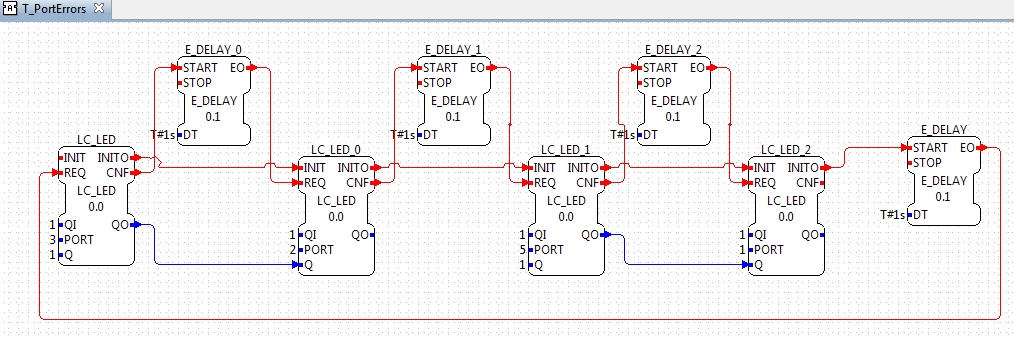
Regression Test 3: Test Port errors are handled correctly
- Order of the inits is important so the errors / LEDs expects turn on or are ignored
Thursday, September 29, 2011
Sept.29 Clean-up and Motor ports
Code clean-up time.
AVR Control class still needs some more clean-up, but otherwise FBs are used now.
1. CL_Button and CL_SensorPortMgr are now in associated FBs and tested.
Our good friend blinky is deleted.
Means you have to guess when you can start the eth_serial communication, but even with blinky it was possible to start it too soon.
Using the include define flag didn't work because of the order of compiling.
But handcoding one so if no Button FB , buttons are not polled, which make Button FB not always required
saves 2536 bytes. We have enough space at moment, but that's alot isn't?
*2. Should all FBs that don't do port checking (L_LED, L_TOUCH, L_SOUND) be:
- deleted
- go in different pallette
- be kept and go in the same pallette
???
They are slightly smaller since not composite FBs, but would not be considered safe.
3. Can LMS device wide constants go in LMS_DEV?
like max motors and max sensors? in multiple places at the moment and shouldn't be.
supported sensor list?
After avr ctl is cleaned up, do its methods really belong in the LMS device?
Its not a sub-device, its part of the LMS device.
4. Comments and clean-up
tabs - have to set for every type editor!!! Hope I got them all.
Made more things private in various classes
Either deleted extra comments or added a TODO or TOFIX to explain why didnt want to lose the info.
Added a few more checks for the motor including extra FBs for port checking
LC_M_PWR with port checking and L_M_PORT FB
Tuesday, September 27, 2011

Sept.27 Button FB and Motor FB updates
Button FB
LMS has little space so to save string space, event names are repeated
BUT for the button I can never remember which is a "match" a button and "button changed", so changed to:
LMS has little space so to save string space, event names are repeated
BUT for the button I can never remember which is a "match" a button and "button changed", so changed to:
- MATCH/CNF - button, b, pressed matches button pressed
- CHG/IND - button pressed changed (including no button to some button pressed)
Full Tests:
Use a e_cycle every 300ms to check the buttons
Test 1 (works, but..):
Press button and associated led comes on
Test 2 (works, but..)
- Additonally when Enter pressed, then led comes on and motor moves.
- BUT sometimes when Enter released, led and motor stay on
- 9/29 Buttons are sampled at slower rate than thought so debounce time /counter was too long(1.5sec)/ large (25). Changed so now works.
- Should a STOP event be added or is it ok to use INIT event to stop a motor?
- Removed BR, brake/coast, flag for L_M_PWR FB.
- Currently the motor is turned on and left on until stopped via INIT event or PWR =0.
- Braking when the motor power > 0, could be damaging to the motors.
- BR flag could be used in a future FB that moves a specific angle
Subscribe to:
Posts (Atom)