Saturday, November 12, 2011

Nov.14 Comments in 4diac-ide

This entry is a start to review and try to make info seen consistent in 4diac-ide.


How can "things" be commented in 4diac-ide? Under properties. 

Which properties?  comment, description  misc> instance comment

Is there a consistent way to comment your own and see for existing "things"?
First:
What are all of the "things"?  Which properties do they use? Where are they seen?
  • System Configuration  
    • Device Instance
    • Resource 
      • description seen in Palette
        • (How do device and resources get added to this palette?)
    • Seen: 
      • Mapped To: .
      • Deployment under Resource selection  
    • Properties - Deployment  
      • next to Device Instance name 
      • Misc - Profile = Holobloc ?? never shown
  • Function blocks (FBs)
    • FB type name
      • Properties 
        • Comment 
          • seen - FB Palette if settings=details
          • often default value like "Basic Function Block"
        • Description
          • ?? never shown
    • In Application: mouse over both
      • FB instance name
      • FB type name
        • see:FB type name / System name/ Application name / mapped t
    • Interface 
      • events and data variables
        • Properties: comment 
          • seen - mouse over in application
      • event "with" data connections
        • seen - mouse over in application
  • Applications
    • FB instances
      • Properties: misc comment 
        • seen - mouse over in application
    • Connections between FBs
      • Properties:  misc comment 
        • seen - mouse over in application
    • Sub-applications
      • seen: mapped to
        • Notice not there like with FB
      • subapp window
        • FB instance name
        • Less info than FB in application without a subapp like no
          • Application name
          • FB type name
        • mapped to 
          • Notice not there like with FB

    Friday, November 11, 2011

    Nov.11 Binary counter

    A friend likes to use binary clock to interest and teach binary in elementary school. This app just counts up to 16 in binary. Seemed like a good finger / test exercise, but also shows the IEC61499 could be used to teach simple circuits.
    Full application, hopefully resembling simple circuits
    Same application using sub-apps:(dashed lines really solid)
    • FB_ADD, FB_XOR had to be added (to math.FBRT).  FB_OR and FB_NOT were added for completeness. Since the FBRT.jar has FB_ADD and 3 basic logic FBs and their interface matches the IEC61131 3. SelectionComparison.BitwiseBoolean FBs, (but not their names) only cloning these FBs was needed. 
    • This app could be used with LMS light sensors and forte, not just FBDK FBs and display on a PC.
    • To further test sub-applications, the application was grouped into sub-apps. This worked, but the tries that did not work are at the end.

    The same working application mapped and working:
    To work correctly sub-apps must be mapped both:
    1. inside each sub-app
    2. in application

    Sub-app funnies: 
    Notice the sysconf window. The connection to the init has to be the FB inside the Sub-App. Connections to cold/warm to subapp event is not allowed. But due to requiring both mapping the sub-app FBs show is no connections among each other. And on top is the regular app view with sub-app and connections.

    Previous try was worse. The sub-apps were just mapped inside the sub-apps, but not the application: (unmap inside the sub-app must be done 1 FB at a time.)

    First try, the sub-apps were only mapped inside the application. In sysconf the cold/warm connectors could not be connected to a subapp connector. (Screen shot did not capture the cursor with the forbidden circle with slash).


    Thursday, November 10, 2011

    Nov.10 fordiac tutorials

    Idea is to create tutorials that help those who know IEC 61499 standard get started with fordiac.
    The last 2 years hysteresis (FBDK IDE)  has been used with Masters level Elec.Eng. and touch on/off LED and flip-flop blinky with first semester Elec.Eng. (LMS with 4diac-IDE).


    First idea was hysteresis problem for those who know IEC 61499. However a minor detail was forgotten, this lab always used FBDK in the past. To use create new FBs with fordiac and use FBDK HMI in /out FBs means even the first applications have to be distributed. So this has been abandoned for the moment.


    Instead a tutorial which explains the existing application that comes with 4diac-ide was created:
    Getting Started: Using TestSystem supplied   (link on fordiac dev wiki main page)


    Flip-Flop tutorial to explain both fordiac and IEC 61499 application and FB development is in progress.

    • Flip-Flop Creating an application is ready to be tried.
    • Flip-Flop Application Structuring with Sub-Applications - has shown up some funnies / inconsistencies in the IDE. This needs to be tested with more current versions of the IDE
    • Flip-Flop Developing Function Blocks is in progress

    Thursday, October 27, 2011

    Oct.27+ Video Tutorials

    Enchanting project tutorials are mostly videos and very helpful.
    So started experimenting with screen capture tutorials for IEC61499 / fordiac


    Screen capture: CamStudio as .avi, but can easily be converted to Flash (.swf)
       Tutorials and other documentation online is helpful, like using 20 frames/sec.
       However the video file is still large, so still learning the best options to record.


    Editing:  Windows Movie Maker for now.


    More to come....

    Tuesday, October 25, 2011

    Oct.25 Follow-ups

    3 Freshman EE labs (1 hour)
    Today was the last of the 1 hour labs. Today two groups finished all exercises and had time to add in motors. An existing Lego "car" robot and mechanical arm robot has their motors plugged into the LMS with forte.  They first tried 1 motor and then had it go in circle with 1 motor forward and 1 motor backwards. The mechanical arm just rotated up /down.


    Last week no one finished. Difference was this week started switching the LED on and off via touch and then adding in a second switch and SR FBs.  The last group had problems understanding/ remembering to take out the battery to turn off the LMS. Fortunately this has been changed to the push of a couple of key leading to the next item...


    Buttons (and AVRctl):
    • Debouncing was changed to only use the value.
    • Decoding is only done now in the Button FB
    • Right+Left Keys now turn off the LMS
    • Code clean-up to match standards - so code review time again
    Clock time differences:
    The ecos numerator and denominator were changed to match the clock times for LMS found in both Lego and Lejos firmwares. New ecos is still being evaluated.


    Wednesday, October 19, 2011

    Oct.19 Freshman EE Lab

    The following exercises were used with freshman electrical engineers for 1 hour lab.


    Some of the basic concepts touched on were:

    • Use of Touch sensor for control
    • A blinky LED is to electrical engineering like Hello World is to  programming.
    • Flip-flop via blinking LED, plus Set/Reset and Switch FBs
    • Trigger on raising edge (turned on) and trigger on falling edge (turned off)
    • In Ex.4 reuse of patterns to do something similar

    Ex.1 was explained, most finished Ex.2, half made progress on Ex.3, but none fully finished.


    Ex.1 Press Touch and LED comes on
    Ex.2 Press Touch and LED starts to blink


    Ex.3 Press Touch and LED starts to blink, then release Touch and the blinking stops


    Ex.4 Press Touch blinking starts, then press Touch a second time and the blinking stops


    Saturday, October 15, 2011

    Oct.15 Regression tests

    Finally buttons and avr code clean-up is hopefully finished.
    Alot of the testing was to be sure nothing broke due to clean-up.

    Regression Test 1: Test as many LMS FBs as possible
    • Touch turns on LED 2
    • Enter turns on Motor and an LED 1
    • If LED1 measures enough light then LED3 comes on. 
      • If turn LED2 and point at LED1, then LED3 comes on.
      • Or if room very light try putting finger over LED1 and LED 3 should go off
      • Very sensitive to room's lighting and might flicker if room light close to light boundary
    • Left +Enter turns off

    Regression Test 2: Test all buttons

    • Change numbers to test button combinations
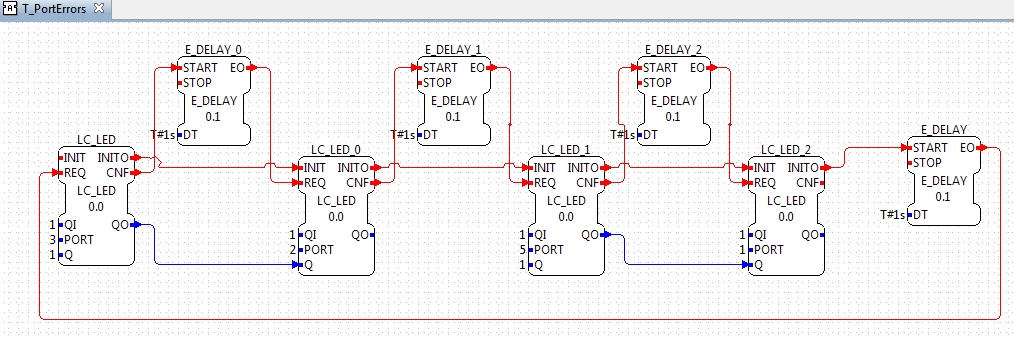
    Regression Test 3: Test Port errors are handled correctly

    • Order of the inits is important so the errors / LEDs expects turn on or are ignored